How to Manage Your Seller Inventory

May 8, 2026
Support Center

/

How to Manage Your Seller Inventory

Every vehicle that has been inspected and conditioned by ACV lives here, ready to be sent to auction or listed as a Guaranteed Sale.
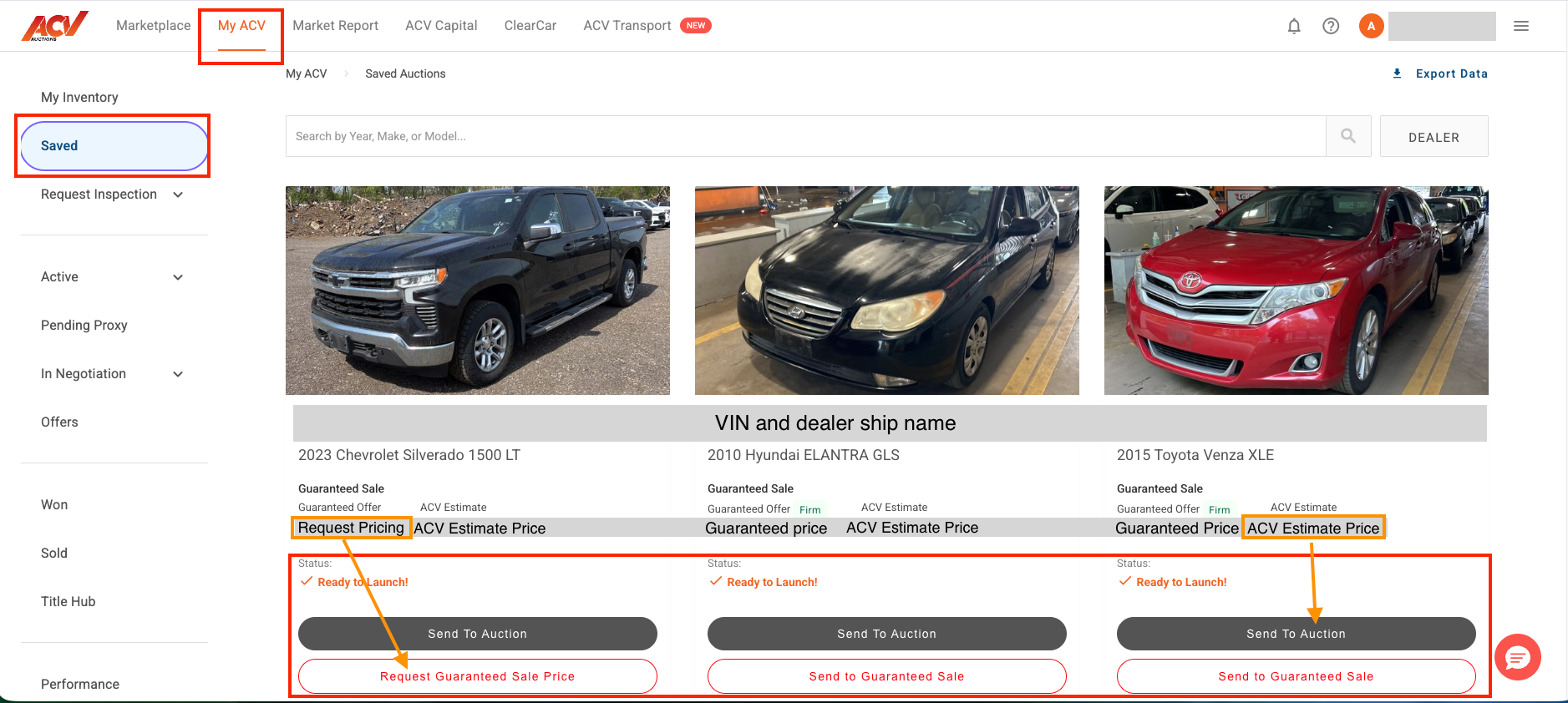
Steps

  1. From the top navigation, select My ACV.
  2. In the left sidebar, select Saved.
  3. Your inspected vehicles appear as cards showing the VIN, vehicle details, ACV Estimate, and current status.
  4. Vehicles with a Ready to Launch status are fully conditioned and ready to list.

Reviewing a vehicle’s condition report and estimate

  • Select any vehicle card to open its full Condition Report.
  • The ACV Estimate is an automatically generated market value based on condition data and recent transaction history.
  • If a Firm price is shown, ACV has set a guaranteed offer for that vehicle.

Exporting your inventory

  1. From the Saved view, select Export Data (in the top right-hand corner of the screen).
  2. A spreadsheet of your current seller inventory will download.

What to expect

Vehicles appear in Saved after an inspection is complete. If a vehicle is missing, confirm the inspection has been submitted and completed under Request Inspection > Requested.

Need more help? Visit our Support Center or call 1-800-553-4070. Phone support is available Monday-Friday 9am-10pm ET and Saturday 9am-2pm ET.

Related articles