How to Track Your Active Bids

May 8, 2026
Support Center

/

How to Track Your Active Bids

You can use this feature to monitor your bid position and respond to counters without going back to the Marketplace.
Steps

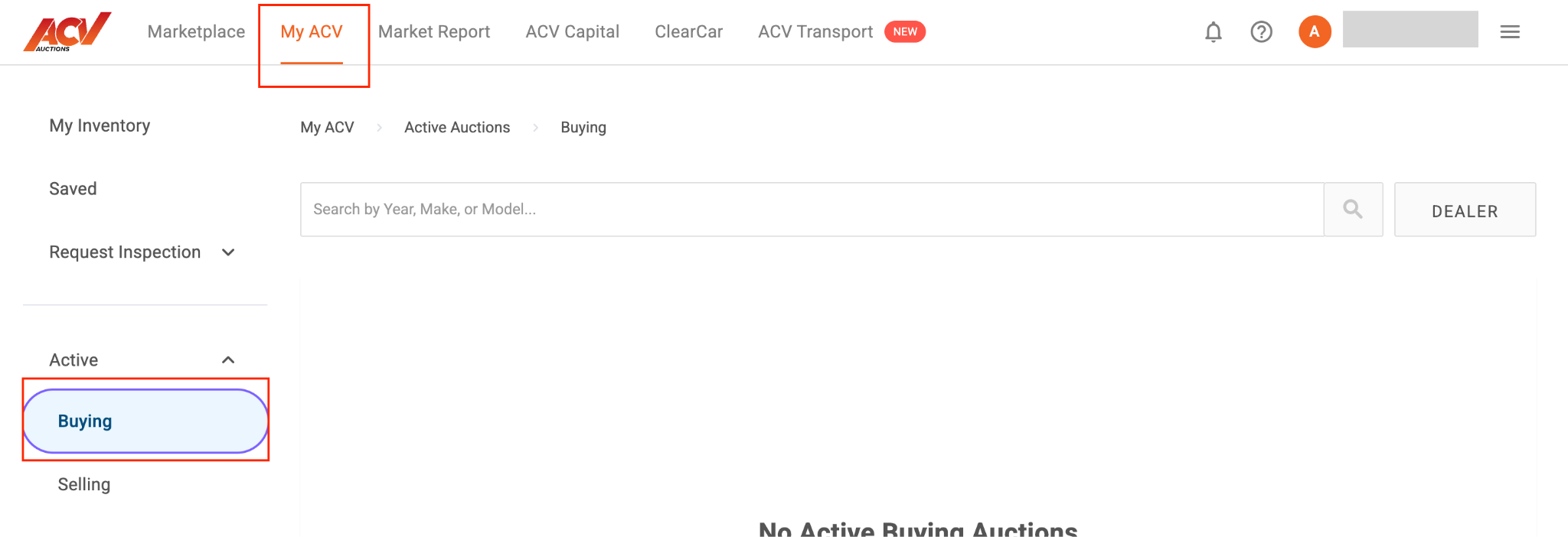
  1. From the top navigation, select My ACV.
  2. In the left sidebar, select Active, then Buying.
  1. Your active buying auctions appear here with current bid, time remaining, reserve status, and your bid position.
  2. If you are the high bidder, your card will show that status. If you have been outbid, it will be indicated, and you can place a new bid from within the view.
  3. Select any auction to view its full details and take action (bid, set a proxy, or add to the watchlist).

What to expect

Active Buying updates in real time. Auctions that end while you are viewing the list will show their final status until you refresh.

Troubleshooting

I don’t see any active auctions. You only appear here if you have placed a bid. If you set a proxy bid on a Coming Soon vehicle that has not yet gone live, check My ACV > Pending Proxy instead.

Need more help? Visit our Support Center or call 1-800-553-4070. Phone support is available Monday-Friday 9am-10pm ET and Saturday 9am-2pm ET.

Related articles