How to Set a Proxy Bid

May 4, 2026
Support Center

/

How to Set a Proxy Bid

Steps

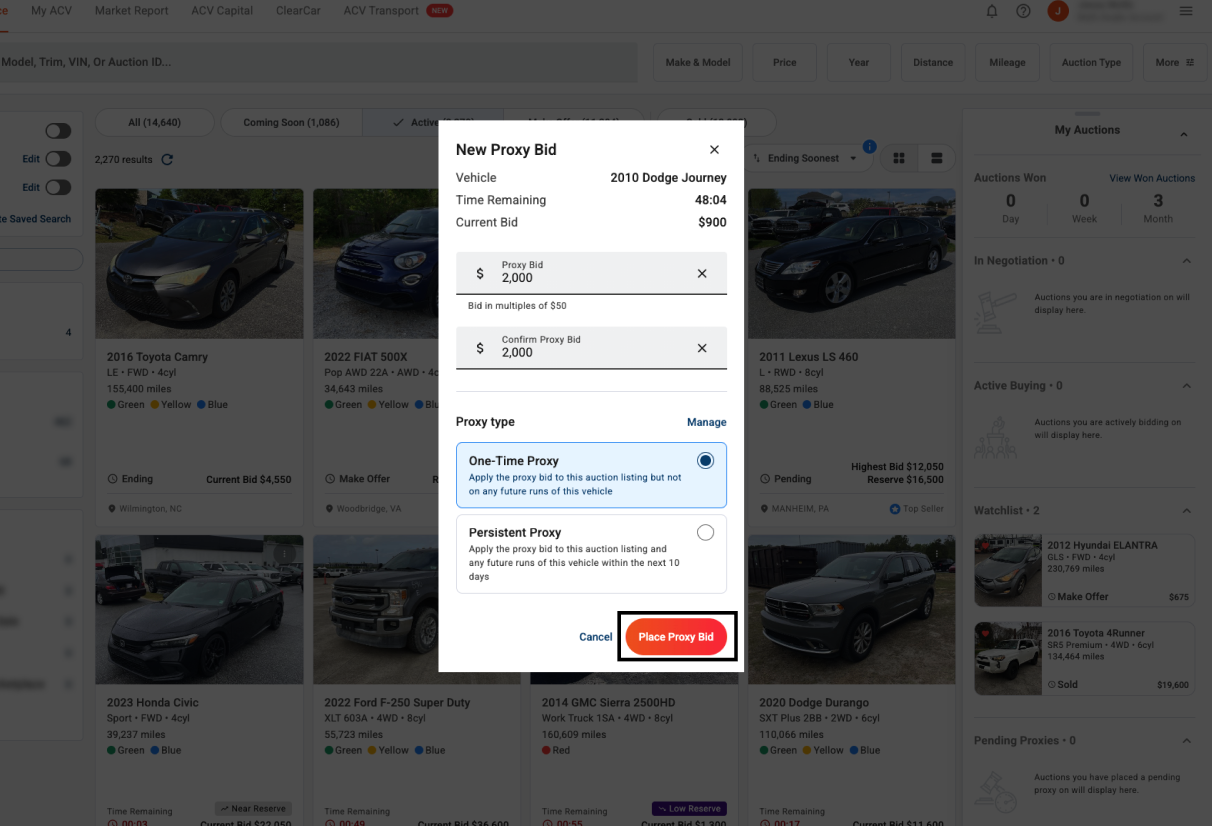
  1. From the vehicle card or Condition Report, select Set Proxy.

  1. You can choose to set a one-time proxy or a Persistent proxy. Enter the maximum amount you are willing to pay for the vehicle. 

                      A Persistent proxy is setting a proxy on this run and any other runs within the next 10 days. 

  1. Confirm your proxy bid.

How proxy bidding works

  • Your proxy bid does not immediately jump to your maximum. It starts at $50 over the current high bid and only increases when another buyer counters.
  • If someone bids above your proxy maximum, you will be outbid and notified.
  • A proxy bid overrides a live bid: if you set a proxy of $10,000 and someone bids $9,500, your proxy automatically responds at $9,550.
  • You can update your proxy bid by increasing the amount at any time during the auction. You can not decrease or pull your proxy from an auction once you’ve set the proxy amount. 

Setting a proxy on Coming Soon vehicles

You can set a proxy bid on vehicles in the Coming Soon tab before the auction opens. Your proxy will be active from the moment the auction starts.

What to expect

You will receive a notification if you are outbid. Check My ACV > Pending Proxy to see all vehicles where your proxy is waiting.

Related articles