How to View Won Auctions and Complete Your Purchase

May 8, 2026
Support Center

/

How to View Won Auctions and Complete Your Purchase

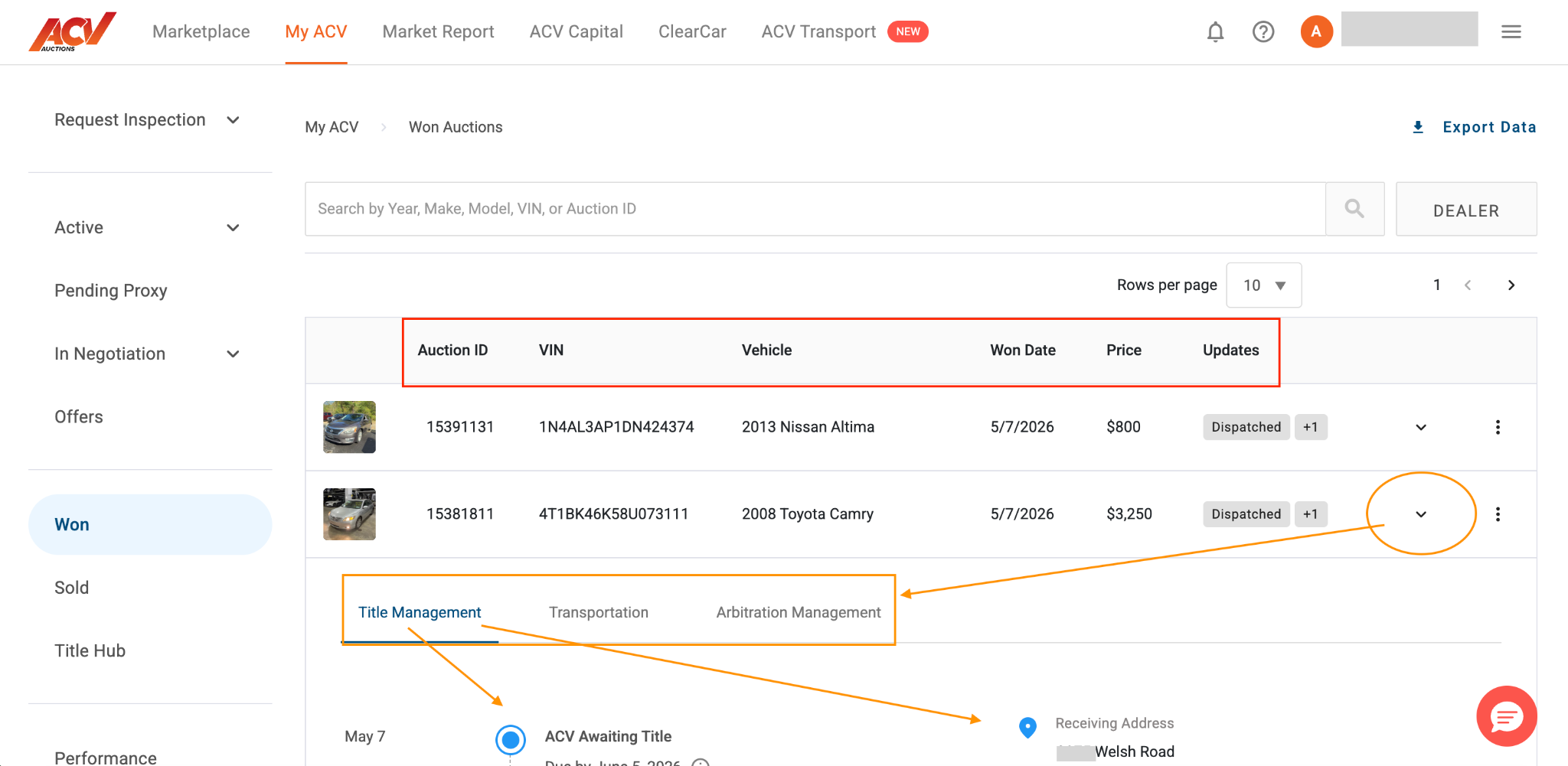
From here you can arrange transportation, manage the title transfer, and submit arbitration if needed.

Steps

  1. From the top navigation, select My ACV.
  2. In the left sidebar, select Won.
  1. Your won auctions appear in a table showing Auction ID, VIN, vehicle, won date, price, and status.
  2. Select the expand icon on any row to see available actions:
  • Title Management – track the status of your vehicle’s title transfer
  • Transportation – arrange delivery to your dealership via ACV Transport
  • Arbitration Management – submit a dispute if there is a material condition discrepancy

Finalizing a purchase

After winning an auction, you will be prompted to select a payment method and arrange transportation. Complete both steps to finalize the purchase and release the gate pass.

What to expect

Auctions that have been fully finalized show a Finalized status. Title information may take time to appear – if no title information is shown, check back within 1-2 business days.

Need more help? Visit our Support Center or call 1-800-553-4070. Phone support is available Monday-Friday 9am-10pm ET and Saturday 9am-2pm ET.

Related articles